Brat Generator White — White Text Brat Covers & Memes
A brat generator white version swaps the usual black text for white text, keeping the same stretched lowercase look and soft blur. It works best on a dark background, where white letters stay clear and the mood feels quieter than the loud brat green. Use it for covers and memes that need to sit calmly on a dark feed, a story, or a profile picture, rather than shouting from a bright square.
Tip: press Enter in the text box for a new line. The brat look is stretched lowercase Arial with a slight blur, on brat green #8ACE00.
For the full white-text maker and its setup options, start with the brat generator white text page and the white text setup guide. This page does not repeat those setup steps. Instead, it covers the covers-and-memes angle: when white text is the right choice, how to shape a cover or a meme around it, and how to keep the words readable.
When White Text Works Better Than Black Text
Black text on brat green is bold, bright, and instantly recognisable. It suits a statement cover, a playlist image, or anything that should stand out in a grid. White text is the opposite choice: it suits a dark background, a night-time mood, or a design where the words should feel like a whisper rather than a shout.
- Choose white text on black, charcoal, or another very dark background, for covers, memes, and stories with a calm or late-night feel.
- Choose black text on brat green for the classic album-cover look, and for any image that must catch the eye at a glance.
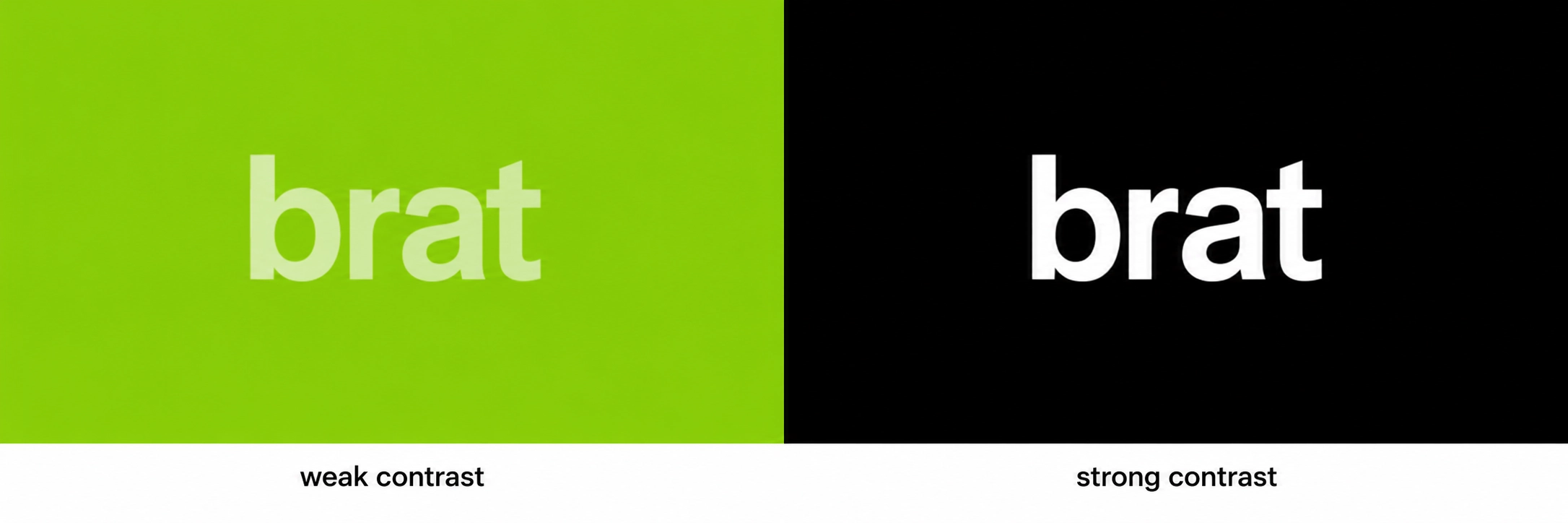
- Avoid white text on brat green or any light background. The contrast is too low, and the letters will fade into the colour behind them.
- Avoid black text on a very dark background for the same reason. Match the text colour to the background, not to habit.
How to Make White Text Brat Covers Step by Step
A white-text cover uses the same lettering as the classic version. Only the colours change, so the steps below focus on the choices that make white text work: background, contrast, and preview size.
- Choose one short word or line, and check the spelling. White text is less forgiving of a typo, because it draws the eye to the shape of the word.
- Type it in lowercase, and stretch it wide, keeping it low in the square as on a classic brat cover.
- Set the text to white, and the background to black or a very dark colour.
- Add a small amount of blur, so the letters look soft rather than sharp.
- Preview the cover at thumbnail size, on a dark feed if possible, before you download it.
- Download the image as PNG for a cover, and keep a second export if you need a different shape.
The brat font page and the guide Brat Font: What It Is and How to Recreate It explain the stretched lowercase lettering behind both versions. The colour choice is the only part that changes here.
How to Make White Text Brat Memes
Memes work differently from covers. A cover is a single word or line on its own; a meme usually pairs a short line with a situation, a reaction, or a shared joke. The brat styling should stay in the background, letting the words carry the humour.
- Keep the line short and plain. A meme that needs explaining is rarely funny at a glance.
- Use one line only, in lowercase, and let the stretched white text be the whole design.
- Place the text low in the square, with plenty of dark space above it, so the image feels calm and confident.
- Do not add captions, borders, or extra text. If the line needs a second sentence, it is probably too long.
- Test the meme as a small image in a chat or a feed. If the joke is not clear there, shorten the line.

Tips for White Text That Stays Readable
- Use a truly dark background. A mid-grey background weakens the contrast and makes white text look washed out.
- Keep the blur light. White letters blur into a dark background more easily than black letters blur into green.
- Leave space around the words. Crowded white text on a dark square is harder to read than the same words with room to breathe.
- Check the image on a phone, in both light and dark mode, because the surrounding interface changes how the background reads.
- Save the largest export you can, and make smaller copies from it, so the letters stay sharp when the image is shared.

If you need the exact green for a classic cover instead, see the brat green hex code page and the colour format guide. For the classic black-on-green version, the BratGen Free homepage is the starting point.
Brat Generator White FAQ
What is a brat generator white version?
It is the same stretched lowercase brat style, with white text instead of black text, usually on a dark background. The lettering and blur stay the same; only the colours change.
When should I use white text instead of black text?
Use white text on a dark background when you want a calmer, quieter look, such as a late-night cover or a meme. Use black text on brat green for the classic, bold album-cover look.
Can I use white text on brat green?
It is not a good choice. White text on bright green has low contrast and is hard to read, especially at a small size. Keep white text for dark backgrounds only.
Does white text need more or less blur?
Less, or the same light amount. White letters soften quickly against a dark background, so check the result at thumbnail size and reduce the blur if any letter starts to fade.
Can I use a white text cover as a profile picture?
Yes. Export a square image, keep the word short, and check how it crops into a circle on a dark background. If a letter is cut off, move the text or shorten the word.
White text is a quieter version of the same idea: stretched, lowercase, slightly soft, and confident. Choose a dark background, keep the line short, and let the contrast do the work.